Adoption to Rich Internet Applications is increasing. What about the products which were developed earlier and are not RIAs? how will they adopt RIA? It’s very simple. If your software has a architecture where the business logic is clearly separated from other layers, then you just have to start learning Adobe Flex and develop and RIA. Because Adobe Flex allows us to invoke Java objects on the server from the client side Flex application.
Updated: Free AIR based Tool to generate Flex code for consuming/exposing Java classes as BlazeDS Remoting services. Visit this URL for more details https://sujitreddyg.wordpress.com/2009/05/07/blazemonster/
How to invoke Java methods from Flex application?
- Add an mapping to the Java class to services-config.xml
- Map your RemoteObject (provided with Flex SDK) on the client side to the destination configured in services-config.xml
- Invoke the method in your Java class using the RemoteObject instance
What do you need to invoke a Java method from the client side application?
- Flex Builder
- Blaze DS
Isn’t that simple? Let’s get into details of implementing this.
Set up Blaze DS
Please follow the instructions in the article at this URL to set up BlazeDS https://sujitreddyg.wordpress.com/2009/04/07/setting-up-blazeds
Creating Java class
Create the Java class with the code below and compile it. We should deploy this class in a location, where Blaze DS can find and instantiate this class. Under the folder where the Blaze DS zip file was extracted, navigate to tomcat/webapps/blazeds/WEB-INF/classes and then copy the Java class in appropriate directory structure.
RemoteServiceHandler.java
package com.adobe.remoteobjects;
import java.util.Date;
public class RemoteServiceHandler {
public RemoteServiceHandler()
{
//This is required for the Blaze DS to instantiate the class
}
public String getResults(String name)
{
String result = null;
result = “Hi ” + name + “, this is a service and the time now is : ” + new Date();
return result;
}
}
Creating Flex application
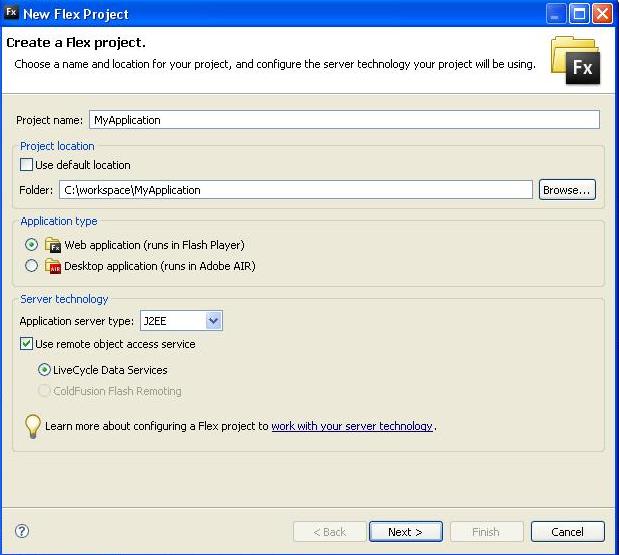
Using the Flex Builder select File -> New -> Flex Project. Create new Flex project window will be displayed. Give your application name and other details. Select the Application Server type to J2EE. Please find the screen shot of the window I filled while developing.
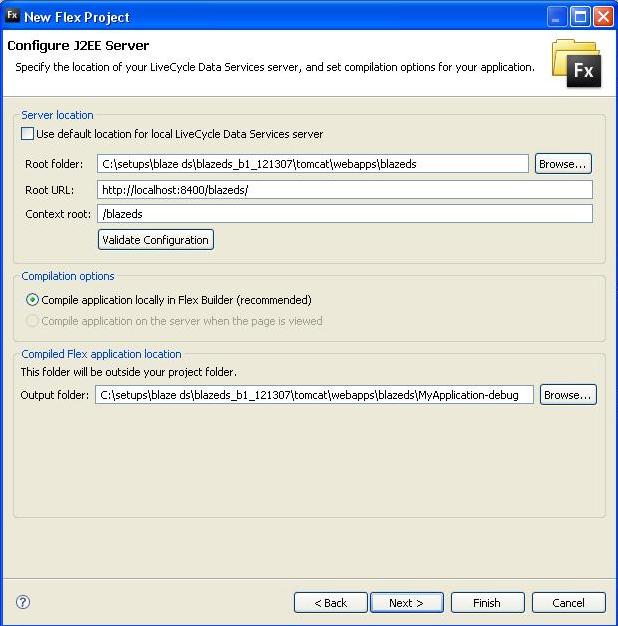
Click Next and then Server Configuration window will be displayed. Modify the values in this window to reflect the paths in your system. Please find the sample values in the image below. Select the output folder properly so that the Flex application is compiled directly into the Tomcat web application directory.
Once this is done continue with the project creation setup and complete it.
Code to be included in the MXML file to invoke the Java class on the server is available below.
In the RemoteObject, the value of the destination property should be set to the ID of the destination, which will be added to the configuration file (Explained below).
MyApplication.mxml
<?xml version=”1.0″ encoding=”utf-8″?>
<mx:Application xmlns:mx=”http://www.adobe.com/2006/mxml” layout=”vertical”>
<mx:Script>
<![CDATA[
import mx.controls.Alert;
]]>
</mx:Script>
<mx:RemoteObject id=”remObj”
destination=”CreatingRpc”
result=”Alert.show(event.result.toString());”
fault=”Alert.show(event.fault.faultString);”
/>
<mx:Button id=”remoteService” label=”Remote Service” click=”remObj.getResults(‘Sujit’);”/>
</mx:Application>
This application has been configured to compile the output to the tomcat web application folder. Now that we have done developing the files required on both the client and the server. We need to configure Blaze DS.
Configuring Blaze DS
Navigate to tomcat/webapps/blazeds/WEB-INF/flex and open the file remote-config.xml. Replace the XML file content with the content below. The ID of the destination added below will be used by the components at the client side. Destination added will be map the destination name to the Java class, which has to be invoked.
remote-config.xml
<?xml version=”1.0″ encoding=”UTF-8″?>
<service id=”remoting-service”
class=”flex.messaging.services.RemotingService”>
<adapters>
<adapter-definition id=”java-object” class=”flex.messaging.services.remoting.adapters.JavaAdapter” default=”true”/>
</adapters>
<default-channels>
<channel ref=”my-amf”/>
</default-channels>
<destination id=”CreatingRpc”>
<properties>
<source>com.adobe.remoteobjects.RemoteServiceHandler</source>
</properties>
<adapter ref=”java-object”/>
</destination>
</service>
Executing the application
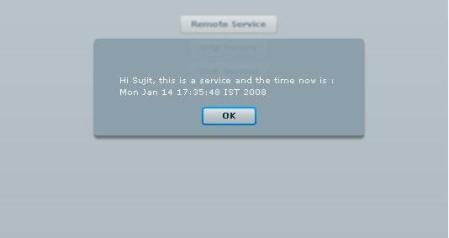
Start the Tomcat server. Navigate to http://localhost:8400/blazeds/MyApplication-debug/MyApplication.html in your browser. Click on the Remote Service button and then you can see the message from the Java class. Find the snapshot of the application displaying the response from the Java class below.


 Sujit Reddy G - The Evangelist
Thanks for the walk through! I was not able to get anywhere with the instructions on the adobe website, but yours are clear and concise!
Thanks for the comments. Please let me know if i can help you in using Flex, Adobe AIR and Flex with Java.
In few lines, easy to understand, Thanks. I Have a question: ¿Where are located the BlazeDS classes such flex.messaging.services.AbstractBootstrapService for compiling custom Java classes? thanks.
The AbstractBootstrapService class is in flex-messaging-core.jar. Once you extract the BlazeDS zip file, you can find this jar file in any of the sample BlazeDS web applications lib folder.
[…] Handling Java Exceptions in Flex application We can invoke Java objects using BlazeDS. For details on how to invoke Java objects from flex visit this URL Invoking Java methods from Flex […]
I appreciate your research on flex applications. Very useful blog. Can you show a path to create application in flex for network diagrams like http://flare.prefuse.org
Hi Giri,
You might have to build a small framework. Please find the sample application in the following URL.
http://www.best4c.com/editor/NetMapApplication.jsp
Hi Sujit,
Thanks for the tutorial, it is simple yet it does the job well.
I know 0 about Flex and was able to implement a simple example of this.
But i have a doubt if you could point me in the right direction it would be great.
Can if transfer complex java objects to a flex client? If so can you give me an example of how it may work?
Thanks in advance.
Hi Rui,
Yes, you can pass Java objects to a flex client. Please refer to my blog on how to map action script objects to Java objects, I have explained how to transfer Java objects to Flex.
Mapping Java objects to AS objects
Hi Sujit,
It was a nice and superb help for a novice in flex like me.I successfully ran the samples.I have a question.
I have some class files in the server.Can I download it locally with flex and invoke them so that the logic of the class files can be performed locally.The class files connect to some urls and extract them and parse them to create xml.So can I run them locally so that the url connections are performed from the local machine ip and not from server ip?
Thanks in advance..
Hi Surya,
you cannot download the Java class file and execute it on the client system. If you download the class file into the flex application, you need JRE to run the class file. Flex application will not allow you to access the JRE on the client machine. What you can do is to get the data from the other urls and then pass them to your class files on your server.
Hope this helps.
Hi Sujit,
Thanx for the prompt reply and indeed it is a clear one.Can any other approach solve this kind of problem for me?? My client wants this kind of system with a rich ui.Can u help me out??
Thanx again in advance.
Hello all,
I have a similiar question like Surja – we want to build an Adobe AIR-application using Flex. In speaks of MVC-pattern, the view and the controller should be build in Flex (great Framework!) and the model in Java, which will run locally on the desktop. I.e. the result should be a normal desktop-application using Flex for the frontend and Java for the backend, all must be running locally (it could be that the PC is not connected to the Internet), so the question is, is it somehow possible to invoke jar-files via AIR?
Thanks in advance for your reply, Karl-Gustav
Hi Karl,
Currently you cannot talk to the Java classes directly from AIR application. Only way is to use sockets for communicating with Java classes from AIR application.
Hope this helps.
Hi Sujit your artical is so good.I want to invoke a java class on client machine from flex is it possible?what my idea is I want to invoke calculator(calc.exe) form windows when ever button is clicked in Flex application.
Hi Venu,
Currently you cannot invoke a Java class from a Flex application. There are work-arounds like having your Java classes listen on a port and intercept the messages from the Flex application.
Hope this helps.
Any idea if this should work with Flex Builder 2, or will only work with Flex Builder 3?
I’ve noticed my project creation wizard is different and when I create my project in Flex Builder 2 and point to my BlazeDS turnkey setup I get the following error in Flex Builder.
Unexpected attribute ‘url’ found in ‘endpoint’ from file: services-config.xml
Thanks,
H Sujit,
Is it possible to expose a flex application remotely through HTTP?
How do I deploy a flex application that uses BlazeDS on a seperate web server? After testing my application locally, I am ready to deploy it in a dedicated web server. How do I change the Flex client properties (like root folder, root URL etc) that point to my local BlazeDS folder to point to BlazeDS that’s running on the dedicated web server?
Hi Sujit,
I need to deploy blaze ds to Websphere CE (Geronimo). I got this part working: When you import blazeds.war into flex builder, the wizard ask for a runtime which I supply with Websphere CE 2.0 adapter (that I configured beforehand).
What I need know is how to setup blazeds in my flex app that is hosted on the app server instead of the default tomcat installation.
thanks
Hi SujitReddy,
Can you give steps to integrate flex with struts framework.
Thanks&Regards,
M.Kumaraswamy.
Hi labradal,
This should be working with Flex 2 also. Please try changing the end point URL to the point to your web application URL. I haven’t tried with FB2 😦 I will try to set it up and try 🙂
Hi Gita,
Can you please give more details on what exactly you are trying to do. If you don’t want to post those details on the blog. Please mail me @ sujitreddy.g@gmail.com
Hi rkri,
You have to change the end point URLs in the services-config.xml to point to the web application where your BlazeDS is running. You will be compiling one services-config.xml with your Flex application and one will remain on the BlazeDS server. The one compiled with your Flex application should have the end point URLs modified to point to your BlazeDS server. You might also have to create cross-domain.xml on the BlazeDS server (not sure if cross-domain.xml is required) .
Hope this helps
Hi Kevin,
BlazeDS is just a J2EE web application. You just have to place the jar files of the BlazeDS into the web application on your server. You have to extract the content in the war file and copy the jar files under WEB-INF/lib into your web applications lib folder.
Hope this helps
Hi Sujit,
I tried the above application and compiled MyApplication.mxml using the flex SDK compiler (As my flexBuilder trial period is over). and when i tried to run MyApplication.swf. i am getting the below error.Could you please help me.
MessagingError message=’Destination ‘CreatingRpc’ either does not exist or the destination has no channels defined (and the application does not define any default channels
Note: I tried hardcoding {context.root} remoting-config.xml
Hey..I just followed u r reply to rkri, and its working
Thanks a lot..
Hi sujit;
tried the above application and compiled MyApplication.mxml using the flex SDK compiler
but i added another some new classes in
D:\ProgramFiles\blazeds_turnkey_3-0-0-544\tomcat\webapps\blazeds\WEB-INF\classes
folder
and similarly trying to access the method of new class ? but m getting runtime axception
FaultCode = Server.Processing
FaultString = No destination with id ‘com.adobe.remoteobjectcts.NewRemoteServiceHandler’ is registered with any service.
Detail = null
Hi All,
I followed the instructions and did the same. But for me getting a message “send failed”. Let me know what may be the reason.Do we need to change anything in services-config.xml ? my tomcat server starts with “MessageBroker failed to start”.
is there anything needed inside the java constructor?
can anybody help me on this?
thanks in advance..
Hi Sachin,
If you are adding a class, you have to create another destination in the remoting-config.xml/services-config.xml and set the source property of the new destination to the Java class. After this you can access the class from the Flex application by setting the RemoteObject component’s destination to the destination created above. Don’t forget to restart the server and clean you Flex project 🙂
Hope this helps.
Hi Sherin,
As you mentioned that you are getting an errors saying the MessageBroker failed to start, can you please send us more details from the error message. Please look for log explaining the reason for the failure. If the MessageBroker Servlet fails to start Remoting will not work 🙂
Hi Sujit,
I MAde What ever u said but still getting an error as follwow
FaultCode = Server.ResourceUnavailable
FaultString = Unable to create a new instance of type ‘com.adobe.remoteobjects.NewRemoteServiceHandler’.
Detail = null
so pls can u help me?
Hi,
thanks a lot sujith..its working fine now. one pblm i think its because of specifying the
application in remoting-config.xml. other pblm was i compiled in jdk1.5 and try to run it through jdk1.6. make sure tht that Java_home envirnment variable is the using jdk kit…
once again…thanks sujit…he help me a lot on this…
Hi Sachin,
Can you please check out your logs. You will find error messages useful for debugging the problem. 🙂 Incase you could not figure out the problem from the error message, please mail the log file to my mail id: sujitreddy.g@gmail.com. I will see if I can figure out the problem.
Hi,
I am also facing the same issue as Sherin. Following is the fault mesaage I am recieveing:
RPC Fault faultString=”Send failed” faultCode=”Client.Error.MessageSend” faultDetail=”Channel.Connect.Failed error NetConnection.Call.Failed: HTTP: Status 404: url: ‘http://localhost:8400/blazeds/messagebroker/amf'”
Hi Sambhav,
Looks like the URL you gave is not correct. Please make sure the BlazeDS jar files are in the lib folder of your web application. Error code 404 means the page is not found.
Hope this helps.
Hi Kumaraswamy.
You can find details on how to integrate Flex in struts framework at this URL: http://www.adobe.com/devnet/flex/articles/struts.html
Hope this helps.
[…] is very similar to configuring your Flex application to use BlazeDS. Please check this URL for details on how to configure your Flex application to point to your BlazeDS folder. All the steps […]
How do we get a dynamically created destination to be recognized by the FLEX client?
We have the java code to set up a new destination dynamically, rather than via XML config, but when try to subscribe on the client side to the new destination, we
get the error:
MessagingError message=’Destination ‘MySecondDest’ either does not exist or the destination has no channels defined (and the application does not define any default channels
Hi Eric,
I was busy with projects this week and so could not reply soon 🙂
Can you please visit the URL below and see if you have missed out something.
http://livedocs.adobe.com/blazeds/1/blazeds_devguide/runtimeconfig_5.html#194376
Please let us know if this helped. 🙂
[…] Pre-requisite: Knowledge on how to invoke Java methods from Flex applications and also have BlazeDS set up on your server. If you have not done this, please visit this URL for details on how to access Java methods from Flex applications. Invoking Java methods from Flex applications […]
[…] Pre-requisite: Knowledge on how to invoke Java methods from Flex applications and also have BlazeDS set up on your server. If you have not done this, please visit this URL for details on how to access Java methods from Flex applications. Invoking Java methods from Flex applications […]
Hello,
Can I use remoting-config.xml, or can u suggest a way to bypass BlazeDS, using directly tomcat 5.5 server ?
Hi Mercury,
I did not understand what you are trying to say. Can you please explain what exactly you want to do. You can definitely bypass BlazeDS if you dont want to, but if you can tell us what exactly u want to do, we can help you out.
Hi Sujith,
I am able to do the remote call with tomcat, but when i tried the same war file with websphere it is not working. Any idea. it give messageloading error
Hi Sujit!
i am trying to call a certaing method from a java class that will return a Boolean..
The returned value will then be used in a function defined inside the script of my flex file…
But it seems that I cannot get the correct returned value…
Please help.
Hi,
i did every single step like you have written in your tutorial,
but if i press the Remoting Services Button there comes the error message
Send failed,
what is it that i could have done wrong ?
Hi sujit
I am also totally new to Flex.I was trying this same stuff importing java in Flex , but it’s giving a rum time error “Faulting application iexplore.exe, version 6.0.2900.2180, faulting module mshtml.dll, version 6.0.2900.3268, fault address 0x0021ac0c.”
Can u plz help what it is?
I am trying to do use java code in flex,but not got any succesful attempt.
Plz Rply ASAP
Hi All,
I am sorry responding after a long long time .. i was totally stuck with project work, we had weekly deadlines 🙂
Hi Merlin,
Send failed is thrown when the Flex client cannot contact your web server. Please make sure the end point URLs are properly configured.
Hope this helps. 🙂
Hi Newto Flex,
Can you please explain what exactly you are trying to do … how exactly are you invoking you Java methods?
Hi Gino,
boolean type from Java are automatically converted in Boolean type in AS3. I used a lot of times. what is the return value you are getting? Please try to share the code in the function in which you are trying to read the returned value from the server.
Hope this helps.
Hi Mansoor,
Did you change the end point URLs etc ??? If you are compiling services-config.xml with Flex application and there is a change in the URL to the web application, please make sure you re-compile your Flex application with modified URLs.
Hope this helps.
Hi Sujit,
I came across your blog while searching for troubleshooting my blazeds application.
I am passing an object rather a big one from flex and through blazeds I am getting that to Java.
I can pass strings but not Objects.
They end up null at the java side.
I have checked the remoting config.xml and also have public constructors to my objects.
Can you tell me on what situations or reasons the objects from flex end up as null objects in Java.
Totally relying on you for my project … because I am new to blazeds and flex.
Thnx,
Sdh
Hi sdh,
Can you please check if you have mapped your custom objects to the objects on the server as explained in the URL below.
Hope this helps.
Thanks, I did not declare the class variables as public, thats what caused the problem for null objects.
I have another question.
I have blazeds bundled with my java Application and I do a “Run on Server” from eclipse with Tomcat.
Whenever I try to access the java application from flex I get the following error.
RPC Fault faultString=”Send failed” faultCode=”Client.Error.MessageSend” faultDetail=”Channel.Connect.Failed error NetConnection.Call.Failed: HTTP: Status 404: url: ‘http://localhost:8080/DCAdmn/messagebroker/amf'”]
why is the channel connect failed message coming up?
This happens only when I run it from eclipse.
Other wise If I deploy my Java App with blazeds directly in Tomcat, I dont get this error.
Has this got some thing to do with services-config.xml ?
Thank you for your help.
Hi Sujit,
Thanks for providing this tutorial, This is very informative. I have a clarification. How feasible it is to replace View with Flex in Spring MVC architecture. Can u please provide me the samples if you have any?
Thanks,
Kishan.
Hi Kishan,
I found few articles. Please check out the URLs below.
http://coenraets.org/flex-spring/
http://www.adobe.com/devnet/flex/articles/fullstack_pt1.html
http://www.adobe.com/cfusion/communityengine/index.cfm?event=showdetails&productId=2&postId=7923
http://www.adobe.com/devnet/flex/articles/struts.html
Hope this helps 🙂
Thanks, sujit iam new to adobeflex its very easy to learn by seeing your articles.
Thanks Poornima 🙂
Hi Sujit,
Currently am using Flex + java and mysql as a backend in my project. Am a java programmer but am new to Flex. ur article is very easy to learn.
Now am facing certain issues. need to update the records in the mysql db and also need to add new rows in the front end using flex. i can able to populate the content from a db in a Flex datagrid.. but while trying to update a record in a datagrid by clicking the update button MysqlNontransient exception has been thrown.
i dont have any idea to add new rows in a datagrid using actionScript.
kindly suggest me how to proceed as earliest as possible.
Thanks in advance
Nithya
Hi Nithya,
This exception should from the Java classes and has nothing to do with Flex application. Check out the Java code that is used for updating the database is working properly. 🙂
Can you please share the code? If you can send the Flex and Java code I can fix the bug 🙂 You can email the source files to sujitreddy.g@gmail.com
Hope this helps.
Thanks sujit. sent u the source code to ur mail id.
plz do clarify me.
Hi sujit,
can u plz tell me how to get the old value in a datagrid once the value has been edited.
For ex:
Datagrid possess value as 1.If i change that particular field value as 3, can able to retrieve the newer value using dg.selectedItem.Name ,.. how to retrieve the oldValue.
plz tel me if u can as earliest as possible
Thanks,
Nithya
Hi Sujit,
i followed all the steps in this article but i get the following message
[MessagingError message=’Destination ‘CreatingRpc’ either does not exist or the destination has no channels defined (and the application does not define any default channels.)’]
Any suggestions?
hey sujit,
i have a .jar file and i need to retrieve it in adobe AIR.is there any way other than socket programming to fetch that???
kindly reply fast…
Hi Jagdish,
I don’t think you can do this as of now.
Hi Sujit,
I appreciate you for sharing your knowledge to many flex developers through this blog. I have a question on RemoteObject’s result handler. Actually when there is no data returned from server, the result handler function is not getting called. How can i handle this situation?
My requirement is to show the datagrid with data when there is a result from server otherwise dont show the datagrid.
Pls give your suggestions on this.
Thanks,
Venkat.
Hi Sujit,
I followed your procedure and I get the following error:
[MessagingError message=’Destination ‘CreatingRpc’ either does not exist or the destination has no channels defined (and the application does not define any default channels.)’]
How do I go about solving this???
HI,
Thanks for the Post very usefull for the beginners, and here iam facing the problem like::: i used the LCD’S rather than the BlazeDS and i followed the same steps as above, but i am getting an Error on fault property of the RemoteObject Component, that is “send failed” ., please help me out, until now i was using PHP for my applications and want to give a try for rhe LCD’s,,, and i have another question for you, can i use the PHP as backend server coding with LCD’s..
awaiting your reply,
Kumar Gandhi.
Hi Kumar,
send failed is thrown for many reasons 🙂 Please trace the FaultEvent object and check the faultDetail property and the rootCause property. You will find reason for the failure.
LCDS and BlazeDS can be used with Java only. Use either AMFPHP or WebORBPHP for Remoting with PHP classes.
Hope this helps.
Hi raj,
Couple of things you can try
1. Clean your project
2. Check if the destination is created in the remoting-config.xml
3. Check if the channel is created in the services-config.xml and mapped to the remoting destination in the remoting-config.xml
4. Check the end-point URL of the channel.
One of the above steps should (WILL) solver your problem. 🙂
Hi Venkat,
Even if you return a null from the Java method the result handler will be invoked. I would either return a null when there is no data and check for null in the Flex application and hide the DataGrid when the data returned is null. You can also return an empty ArrayList from Java and access it as ArrayCollection in Flex applications and hide the DataGrid if the length is zero.
Hope this helps 🙂
Hi Sujit,
Thanks for the reply, and this is the trace on FaultEvent Object.
[FaultEvent fault=[RPC Fault faultString=”Send failed” faultCode=”Client.Error.MessageSend” faultDetail=”Channel.Connect.Failed error NetConnection.Call.Failed: HTTP: Status 503: url: ‘http://localhost:8700/flex/messagebroker/amf'”] messageId=”28960622-709D-0D56-CE05-7A2B3CDE94B4″ type=”fault” bubbles=false cancelable=true eventPhase=2]
So by this what could be wrong ,, i just started R&D on LCD’s please help me out..
regards,
kumar.
Hi Sujit,
Can I invoke a Java class for a stand alone Air App ? I mean to say I do not want to call any server side codes. It is a stand alone app which has to execute some dos commands in the local machine.(Even executing a batch file will do)
Thanks 🙂
Hi Akshat,
Try Merapi http://www.merapiproject.net/index.php
Hi Kumar,
Looks like your server is refusing the connection. Please try to find if there are any errors on the stdout of the web server. Please try accessing the URL ‘http://localhost:8700/flex/messagebroker/amf from the web browser.
Hope this helps.
[…] https://sujitreddyg.wordpress.com/2008/01/14/invoking-java-methods-from-adobe-flex/ […]
Hi sujit,
while accessing the URL its showing many error messages on the browser. they are given below.
javax.servlet.UnavailableException: Error instantiating application scoped instance of type ‘kumar.RemoteServiceHandler’ for destination ‘CreatingRpc’.
at flex.messaging.MessageBrokerServlet.init(MessageBrokerServlet.java:154)
at jrun.servlet.WebApplicationService.loadServlet(WebApplicationService.java:1200)
at jrun.servlet.JRunRequestDispatcher.init(JRunRequestDispatcher.java:812)
at jrun.servlet.JRunRequestDispatcher.(JRunRequestDispatcher.java:100)
at jrun.servlet.WebApplicationService.getDispatcher(WebApplicationService.java:867)
at jrun.servlet.ServletEngineService$1.fetch(ServletEngineService.java:511)
at jrunx.util.Cache.get(Cache.java:116)
at jrun.servlet.ServletEngineService.dispatch(ServletEngineService.java:537)
at jrun.servlet.http.WebService.invokeRunnable(WebService.java:172)
at jrunx.scheduler.ThreadPool$ThreadThrottle.invokeRunnable(ThreadPool.java:428)
at jrunx.scheduler.WorkerThread.run(WorkerThread.java:66)
regards,
kumar.
I was searching many sites for LCDS tutorial.those were not clear.yours is simply superb!!!!. keep posting.
Hi Sujit,
I tried your code locally.
while clicking “remote service” button.I’m getting “sending failed” popup. then i looked at the logs.
Oct 17, 2008 4:23:34 PM org.apache.catalina.core.StandardWrapperValve invoke
INFO: Servlet MessageBrokerServlet is currently unavailable
please help me to fix it
I have set up my dev environment and created a site that calls a java class file. This all works perfectly in the dev environment. When I start the Tomcat server from within flex it works. When I start the server using the startup.bat file, and try to view the site in a browser, my java calls dont work. In fact, there is error message in server startup that says, “Error instantiating application scoped instance of type ‘RSSReader’ for destination ‘myRSSReader’.” Why can’t I view my site on the server without calling it from flex debuging environment?
Hi Drew,
Please try removing the scope tag in the destination and try it. I have found this being reported when the web server is not run as service. Honestly I don’t know why instantiating a class in Application scope doesn’t work when the web server is not running as service.
Hope this helps.
Hi Nedu,
Please check your web server error logs for errors. The error message you got comes when the MessageBrokerServlet instantiation fails. You will definitely find the reason for failing in the web server logs. Mostly it might be because the BlazeDS version expired or some port not being available, etc.
Hope this helps.
Hi Kumar,
Please try removing the scope tag in the destination and try it. I have found this being reported when the web server is not run as service. Honestly I don’t know why instantiating a class in Application scope doesn’t work when the web server is not running as service.
Hope this helps.
hi Sujit,
here i am going to connect the Flex with Struts using WebOrb, do you have any idea about it or any sample code, if you have please share with me.
thanks
areef
Hi,
I have a Java application server on a windows m/c. When the server starts it registers in LDAP. There are feed-clients which send data to this server at very high rate. The server processes the data fed to it by the clients and keeps it all in memory. There are read-clients which discover the server from LDAP and connect to it to consume the processed information. The data read from the server is erased from the memory.
Now I need to make the read-clients available through web. Could this be done with Flex & BlazeDS? If yes, could you send in some hints? If no, is there a commercial product which could help me here?
Thanks,
AV
Thanks alot for this great tutorial!
Thank you for your example!
I used Eclipse 3.3.2 (Europa) with FlexBuilder3 plug-in. Project setup was slightly different from 3.2. But I got the same “send failed” as many here. After two days of searching the Web for solution I found out that the problem was missing Java factory definition in services-config.xml
[…] Posts Invoking Java methods from Adobe FlexHandling Java Exceptions in Flex applicationBlazeDS and LCDS Feature differenceSplitting Flex […]
Hi AV,
Yes you can achieve this using Flex and BlazeDS. Please have a look at Messaging feature in BlazeDS and also at custom messaging adapters.
Hope this helps.
ERROR FIX:
“Channel.Connect.Failed error NetConnection.Call.Failed: HTTP: Status 404 http://localhost:8080/myBlazeDSSite/messagebroker/amf”
I was overwriting the Web.xml file when rebuilding my Java project.
The Web.xml file must register the MessageBrokerServlet
MessageBrokerServlet
……..
The above is now obvious, yet I was spending so much time looking at all of my Flex configuration files, and Flex compile settings, for the source of this error, that I overlooked basic Java.
Hope this saves some pain.
Max
Hi,
We are facing an issue with Flex. If you have any idea, please let me know.
1. We are trying to configure BlazeDS with JBOSS Application Server.
We had created flex mxml file which uses remote object to access the java class using BlazeDS. This works fine with Tomcat server. Problem started when we deployed it to JBOSS.
We had created war file of Flex application that is present under blazeds folder of tomcat server and deployed the same in JBOSS server.
Also we had copied the 3 war files (blazeds.war, ds-console.war, samples.war) to JBOSS Deploy folder.
Normal flex application are working fine in JBOSS server but RemoteObject access is not working and showing error as “No destination with id ‘CreatingRpc’ is registered with any service.” where CreatingRpc is an destination id present in remoting-config.xml.
Please help us to solve this issue.
2. If we are using flex swf file in one system (which uses RemoteObject for accessing java classes in server) and need to access the Server which runs in another PC.
In which way we can access the server. Is it possible through endpoint property in RemoteObject?
Thanks & Regards
Vandana Singh
Hi Vandana,
Since you deployed in JBoss, can you please check if the end point URLs in services-config.xml are changed accordingly.
If you are having BlazeDS deployed on other system, you should change the end point URLs to point to the server, where BlazeDS is deploed.
Hope this helps.
Hi Sujit,
I am trying to create a screen which uses RemoteObject in JBOSS, but it is giving error
Normal flex application are working fine in JBOSS server but RemoteObject access is not working and showing error as “No destination with id ‘CreatingRpc’ is registered with any service.” where CreatingRpc is an destination id present in remoting-config.xml.
I am able to run the sample.war file in JBoss server.
This has one RemoteObject Example and works fine in JBoss server.
Hi Vandana,
I am sure we are missing some configuration here. I can help you if you send me the source code of the Flex application and the service-config.xml and remoting-config.xml to sujitreddy.g@gmail.com
Sujit,
Thanks for your comments.
We just Cleaned the project in Eclipse & then deployed the war file. It worked.
Finding : MessageBroker Servlet does not get configured on Jboss 3 version. MessageBroker Servlet is compatible with Jboss 4 version.
Hi Sujith,
Thanks a lot. I am very new to flex and i did this example it is working fine for me now. I have to create some application which has lot of forms more db transactions. front end should be flex. what is your suggestion for this.
Thanks,
Prasad
Hi Prasad,
What kind of suggestion are u looking for? You can definitely do what ever u mentioned using Flex. Please let me know what problem u r stuck with 🙂
Hi Sujit,
I am new to flex and I am using LCDS. I tried ur example i.e., RemoteServiceHandler but it is showing the following error
[MessagingError message=’Destination ‘product’ either does not exist or the destination has no channels defined (and the application does not define any default channels.)’]
Please kindly reply.
Thanks & Regards
Hi Ram,
Couple of things you can try
1. Clean your project
2. Check if the destination is created in the remoting-config.xml
3. Check if the channel is created in the services-config.xml and mapped to the remoting destination in the remoting-config.xml
4. Check the end-point URL of the channel.
One of the above steps should (WILL) solver your problem. 🙂
Hi, Sujit,
Thanks for your example. I has been very helpful. I like how you explain things: a brief explanation but very useful and easy to understand.
Regards!
Thanks Dunazule 🙂
Hi Sujit,
I am newbie in flex ,my requirment is to integrate spring with flex,could u plz tell me basic like how to config and what are the things require to send request to controller..i m using myeclipse ,can i plugin flex into myeclipse .If so then how ?? plz tell me from where i can find step by step spring+flex tutorial..it’s very urgent…
Please kindly reply.
Thanks & Regards
thanks ,
Himanshu
Hi Himanshu,
Please visit the URL below for more details
http://coenraets.org/flex-spring/
Hope this helps.
hi sujit
when i click the button it says
Send Failed
any idea what’s wrong?
what should i edit in services-config.xml …i havent made any changes to that?
could u post your edited file
hi sujit,
ive edited the services-config.xml and replaced the tokens to get endpoint urls of the form
endpoint url=”http://localhost:8400/blazeds/messagebroker/amf”
but still when i click the button it says Send failed !
Hi Noel,
Please check if this URL is working. If the URL is correct, try running a clean command on your Flex project.
Hope this helps.
hi sujit, really nice and informative article.
Urs and bruce philip’s resources are among some of the best resources available on internet. I was wondering if u can help me with a simple cairngrom example, connecting with java…
thanks and regards
mOIAz
Hi moiaz,
Cairngorm is not specific to any back end technology, just the service in your project will connect to a Java back end using RemoteObject. Please try checking samples for Cairngorm and connecting with Java independently.
Hope this helps.
mxml code.
<!–
–>
java code.
package sample;
import java.sql.*;
import java.io.*;
class insertimage
{
//public static void main(String ar[])throws SQLException
//{
public boolean returnresult(String username,String password,String image,int phone) throws SQLException
{
boolean b = true;
// String username=””;
//String password=””;
Connection connection = null;
String connectionURL = “jdbc:mysql://localhost:3306/storeimages”;
//ResultSet rs = null;
PreparedStatement psmnt = null;
FileInputStream fis;
try
{
Class.forName(“com.mysql.jdbc.Driver”);
connection = DriverManager.getConnection(connectionURL, “root”, “root”);
System.out.println(“Connected to database”);
//File image = new File(“C:/Program Files/Apache Software Foundation/Tomcat 5.5/webapps/servlets-examples/images/data grid.txt”);
psmnt = connection.prepareStatement
(“insert into save_image(userName, password, image, Phone) “+ “values(?,?,?,?)”);
psmnt.setString(1,”poo”);
psmnt.setString(2,”poo”);
psmnt.setString(3,”image”);
psmnt.setInt(4, 99);
// fis = new FileInputStream(image);
// psmnt.setBinaryStream(3, (InputStream)fis, (int)(image.length()));
int s = psmnt.executeUpdate();
Statement st = connection.createStatement();
ResultSet rs = st.executeQuery(“select * from save_image”);
while(rs.next())
{
System.out.println(“username:- ” + rs.getString(1));
System.out.println(“password:- ” + rs.getString(2));
String un=rs.getString(1);
String ps=rs.getString(2);
// System.out.println(“un”+ un);
// System.out.println(“ps”+ ps);
if( ps.equals(rs.getString(1)) && un.equals(rs.getString(2)) )
{
b=true;
System.out.println(“Authenticated user”);
}
else
{
b=false;
System.out.println(“not Authenticated”);
}
}
if(s>0)
{
System.out.println(“Uploaded successfully !”);
}
else
{
System.out.println(“unsucessfull to upload image.”);
}
psmnt.close();
}
catch (Exception ex)
{
System.out.println(“Found some error : “+ex);
}
finally
{
connection.close();
}
return b;
}
}
i am getting this error plz help me
[RPC Fault faultString=”Unable to create a new instance of type ‘sample.insertimage’.” faultCode=”Server.ResourceUnavailable” faultDetail=”Types must have a public, no arguments constructor.”]
Hi Sujit,
I have a problem.I have developed a AIR application and I need to gather information about the system such as RAM,CPU speed,Width,height of the Monitor etc…..
I need to pass these values to the server through the AIR application.
I cant invoke any other application from AIR and AIR does not allow access to the system properties.
Can you shed some light on how would you be doing if you were to do this???
Regards
Ram
[…] Posts Invoking Java methods from Adobe FlexSplitting Flex application into modulesSession data management in Flex RemotingMapping Action Script […]
Hi Ram,
Please check the Capabilities class. More details at this URL http://livedocs.adobe.com/flex/3/langref/flash/system/Capabilities.html
Hope this helps.
Hi Sujit!
I have a problem with the remote objects methods. I have 3 mxml files
one.mxml is the main application
two.mxml is the module being loaded from one.mxml
and three.mxml is the module being loaded from two.mxml
In three.mxml i am using a value object to insert data into a table (using remote objects)
The first time i run the application. it works fine i.e. inserts/updates the table. but when i do it the second time(without refresing the page) i am getting the following error:
RPC Fault faultString=”Cannot invoke method ‘update’.” faultCode=”Server.ResourceUnavailable” faultDetail=”The expected argument types are (Insured_Master) but the supplied types were (flex.messaging.io.amf.ASObject) and converted to (null).”]
at mx.rpc::AbstractInvoker/http://www.adobe.com/2006/flex/mx/internal::faultHandler()[C:\autobuild\3.2.0\frameworks\projects\rpc\src\mx\rpc\AbstractInvoker.as:220]
Value Object ————————-
package
{
[RemoteClass(alias=”Insured_Master”)]
public class Insured_MasterAS
{
public function Insured_MasterAS():void
{
}
public var agentcode:String =””;
public var assigneddepartment:String =””;
public var brokercode:String =””;
}
}
three.mxml Module ————————————–
private function save():void
{
var insuredmaster:Insured_MasterAS = new Insured_MasterAS;
insuredmaster.agentcode = AgentCode_T.text;
insuredmaster.assigneddepartment = Dept_T.text;
this.parentDocument.GetTabDataRO.update(insuredmaster);
}
Hi Reddy,
You are simply awesome . I don’t know how to say thanks to you.
Thanks a lot for your tutorial
KK Chowdhary
Hi Sujit!
I`d like to know the how-to configure an existing J2EE web application to support BlazeDS. In the case I don`t want use the Turnkey downloaded. Something like this:
steps:
1. Add the BlazeDS JAR files and dependent JAR files to the WEB-INF/lib directory.
2. Edit the BlazeDS configuration files in the WEB-INF/flex directory.
3. Define MessageBrokerServlet and a session listener in WEB-INF/web.xml
My question is, where is the JAR files? Are there any other steps?
If you could help me on this I`d be grateful.
Hi Sujit,
Thanks for simple and comprehensive walkthrough.
But my question is —
Is there any way to have the java class also on client side?? — could be like mxml accessing simple java class without deploying java class in tomcat server.
Does it make sense?
–
Hi All,
Sujit, first of all I wud like to thank you for your awesome work.
I got some errors and finally resolved them. So I wanna put here some fixes I made in my app which might help others.
1. Once you create Flex proj using BlazeDS/LCDS, make sure that u have given proper entries explained by sujit
2. Please make sure the endpoint url entry in services-config.xml starts with https and not http for channel-definition id=”my-secure-amf”
3. I removed line application from remoting-config.xml
Finally it worked fine.
Hi Faheem,
Can you please try adding a reference to the Insured_MasterAS AS3 class in the one.mxml file. You can just add a line private var insured:Insured_MasterAS
Hope this helps.
Hi Filipe,
Please check out the article at the URL below.
Hope this helps.
Hi Raghunath,
If it is a web application, there is no way. If it is an AIR application try Merapi.
Hope this helps.
Hi, I keep getting this error
MessagingError message=’Destination ‘CreatingRpc’ either does not exist or the destination…
and noted this is one way to find the solution.
3. Check if the channel is created in the services-config.xml and mapped to the remoting destination in the remoting-config.xml
4. Check the end-point URL of the channel.
How do you create such a channel and map it to remoting destination?
thanks
Hi Matt,
Please try doing as explained in the URL below.
http://www.adobe.com/cfusion/communityengine/index.cfm?event=showdetails&postId=13806&productId=2&loc=en_US
Hope this helps.
Hi Sujit,
I have the following written in my code but whern i do remObj.getResults() in the label i dont get the method.
what is wrong plz let me know
Thanks,
Angelo Mascarenhas
Hi Sujit,
I hope u might help me…
Envirnoment : Tomcat6, Simple Java files, Flex
I am using BlazeD to invoke Java Objects from Flex application. It works fine in JDK1.5. Problem is with JDK1.6. I am getting following error
[RPC Fault faultString=”Send failed” faultCode=”Client.Error.MessageSend” faultDetail=”Channel.Connect.Failed error NetConnection.Call.Failed: HTTP: Status 500″]
at mx.rpc::AbstractInvoker/http://www.adobe.com/2006/flex/mx/internal::faultHandler()
at mx.rpc::Responder/fault()
at mx.rpc::AsyncRequest/fault()
at mx.messaging::ChannelSet/faultPendingSends()
at mx.messaging::ChannelSet/channelFaultHandler()
at flash.events::EventDispatcher/dispatchEventFunction()
at flash.events::EventDispatcher/dispatchEvent()
at mx.messaging::Channel/connectFailed()
at mx.messaging.channels::PollingChannel/connectFailed()
at mx.messaging.channels::AMFChannel/statusHandler()
In Tomcat Server log error logged is
SEVERE: Servlet /Employee threw load() exception
flex.messaging.config.ConfigurationException: Error instantiating application scoped instance of type ‘flex.employee.store.EmployeeService’ for destination ’employeeService’.
Can you please shed some light to overcome the problem.
Thank in advance.
Hi!
Great article. But I have a question. Let’s say I have an application that is in ../tomcat/web-apps/my-app directory, it is normal j2ee app with context root at “/my-app” where I have my own compiled classes under /my-app/WEB-INF/classes folder. So how do I let blazeds application know that I have some java class server side components in my own application? Or do I allways have to manually copy the compiled class files in tomcat/webapps/blazeds/WEB-INF/classes folder so blazeds app can find them ? Is this the only approach or can I set up different class path for my server components. It would be nice if I had all the flex java server side components in one package which would have different class output directory, in this case it would be tomcat/webapps/blazeds/WEB-INF/classes
Hi Sujit, thanks your article. I have a question and wish you will answer. I wanna use http and tcp/ip but when i change in file remoting-config.xml in properties ref=”my-amf” into ref=”http”, it is fail. Can you help me! Thanks much!
Hi Sujit
I am getting this error when trying to work from flex to java using blazeds
faultCode:Channel.Call.Failed faultString:’error’ faultDetail:’NetConnection.Call.Failed: HTTP: Failed’
root cause
NetConnection.Call.Failed
http://localhost:8080/samples/messagebroker/amf
when I put the above url in the web location the page got stuck
Do you have any clue for me
Moshe
Hi chary,
What do you mean ? do you want to just change the channel ref name to http or to use the HTTPChannel class ?
Hi Vijaya,
Can you please share the EmployeeService class file. I will try reproducing that on my system.
Hi Angelo,
Code seems to have been truncated. Please make sure the getLists method is public
Hope this helps.
Hi Simon,
You just have to deploy BlazeDS jar files in your “my-app” web application. Please refer the article at the URL below.
Hope this helps.
Hi Chary,
Please check if there is a channel defined with “http” as its ID in services-config.xml.
Hope this helps.
Hi Moshe,
Sending request to the URL will just display a blank page. Please check if there are any error messages in the server log files. Any other error messages will help 🙂
Hi Sujit!
Thanks your help. It is useful with me!
Chary!
Hi Sujit,
Articles are really informative…I’ve a problem with flex builder. I am trying to create a J2EE project in a new workspace. When doing server configuration, click on ‘New’ button hangs the flex builder & ‘ll not be able to kill the javaw.exe process as well. Any idea why its happening?
Thanks,
Anitha
Hi Sujit,
I am not sure if this the right question but If you can help that would be great!
Is there any way I can integrate an externl application, exe into an AIR application.
I have been trying to come up with an collaboration solution, and there are many 3rd party collaboration tools available it would be great If I can integrate one of those into my Desktop application.
Thanks
Vandana
Hi,
first of all, great blog 😉
I try to adapt the example to my project but it didn´t work.
I get a exception
javax.servlet.UnavailableException: adapter not found for reference ‘Java-object’ in destination ‘CreatingRpc’.
I hope you can help me.
At creating my project, I checked the box “Create combined JAVA/Flex project using WTP”
is that any problem??
best regars
tobi
edit:
I foget to say.
I use an external tomcat version, not the included tomcat comes with the blazeds zip file
and the above error occurse when tomcat is started…
after fire the getresult()event I get “send failed” back.
it´s to late , gn8 😉
new day, new luck
It was very useful.
This is very good & usefull.
Hi Anitha,
The server configuration screen is displayed after clicking on the “New” project button right? Or are you referring to a different button?
Hi Vandana,
As of today, you cannot invoke a external exe from AIR application. If you can let us know your requirements, will check if there are ways to achieve the same.
Hope this helps.
Hi Tobi,
Looks like the adapter definition is not found, first check if the adapter with ID java-object is present in remoting-config.xml. If adapter definition is present, please check if all the BlazeDS jar files are in the classpath. Try to see if there are any errors on the server log file.
Hope this helps.
Hi Tobi,
In that case, please make sure you have BlazeDS set up as explained at this URL https://sujitreddyg.wordpress.com/2009/04/07/setting-up-blazeds/
Hope this helps.
is that flex can receive exception from c / c++ code?
can u or anybody tell me please how to fix this case…
Hi Sujit;
I Create new project using Desktop application (runs in Flash player) option ; and trying to call some java method using RemoteObject tag, but getting the popus message as “send failed.”
while same method of java i can call when i create project with web application (runs in flash player)option.
please guide me.
Yhanks.
Amazing Tutorial which guided me a lot , even i am working in flex for years i am connecting to java through blazeds for the first time and this helped me a lot, not only this post but all of your posts which i was having a look is amazing walk through
Hi Sujit,
How to handle asynchronous calls using remote objects. I want to call a java method mulitple times with different parameters. How to handle this with result event.
Help me out !!!
Thanks,
A. Kumar
Hi Sujit
thanks for the blog, it’s very interesting.
I’m trying to use Flex with EJB3 in the server side using BlazeDS.
I folowed many tutorials but none of them worked for me.
I have my blazeDS installed and it works very well with flex and AIR applications while using normal java classes.
when I try to use EJBs I got the folowing Error while execution:
[RPC Fault faultString=”Cannot invoke method ‘ditBonjour’.” faultCode=”Server.ResourceUnavailable” faultDetail=”Method ‘ditBonjour’ not found.”]
I notice that I tested my EJBs alone and they work perfectly.
NB: I used the ejb factory and made all the modifications :
i added :
to my services-config.xml and in my remoting-config.xml I added the destination :
ejb3
ModelShapeBean
I use a JBoss server please help
thanks
Hi Sachin,
You should be setting the endpoint URL to absolute path. Please find more details at this URL http://www.adobe.com/cfusion/communityengine/index.cfm?event=showDetails&postId=12034&productId=2&loc=en_US
Hope this helps.
Hi A. Kumar,
Please try sending the request as shown below. In this case the AsyncToken returned is per request. You can add event listeners to AsyncToken and more over AsyncToken is dynamic class, you can add your properties to it. In the event listeners you will get the instance of the AsyncToken.
Hope this helps.
var remoteObj:RemoteObject = new RemoteObject();
var o:AbstractOperation = remoteObj.getOperation(“yourmethodName”);
var token:AsyncToken = o.send();
Hi Sujit,
Actually i have code developed in eclipse. What i did is copy the flex folder from blaze DS into my web-inf along with the jars and web.xml.
When i run the tomcat integrated in blazeDS from eclipse. It is not able to get my bean class.
Can you tell me how do i configure blazeDS in eclipse.
Hi Sujit,
I have not found any solution for this error.
[RPC Fault faultString=”Send failed” faultCode=”Client.Error.MessageSend” faultDetail=”Channel.Connect.Failed error NetConnection.Call.Failed: HTTP: Status 404: url: ‘http://localhost:1123/blazeds/messagebroker/amf'”]
When I extracted the folder blazeds.war.In blazeds folder i have not found any folder named as messagebroker.
Please tell me is I am missing some files in war or something.
Sujit,
Im new to FLEX and im tring to invoke java methods using blazeds using your tutorial.
Here is my setup:
1. Created new folder (Flex_Test) with WEB-INF folder, contains FLEX, classes and lib folders. FLEX folder contains all xml files(Remote, service, proxy and data management)
2. Deployed Flex_Test Folder in weblogic 10 and http://localhost:7002/Flex_Test/messagebroker/amf screen coming blank.
3. Then I have created new Flex Project and configure the server setup with above settings
4. I have modified remote-config.xml file as per your tutorial.
5. when I run the mxml file from flex im getting the following error.
[RPC Fault faultString=”Cannot create class of type ‘RemoteServiceHandler’.” faultCode=”Server.ResourceUnavailable” faultDetail=”Type ‘RemoteServiceHandler’ not found.”]
at mx.rpc::AbstractInvoker/http://www.adobe.com/2006/flex/mx/internal::faultHandler()[C:\autobuild\3.2.0\frameworks\projects\rpc\src\mx\rpc\AbstractInvoker.as:220]
at mx.rpc::Responder/fault()[C:\autobuild\3.2.0\frameworks\projects\rpc\src\mx\rpc\Responder.as:53]
at mx.rpc::AsyncRequest/fault()[C:\autobuild\3.2.0\frameworks\projects\rpc\src\mx\rpc\AsyncRequest.as:103]
at NetConnectionMessageResponder/statusHandler()[C:\autobuild\3.2.0\frameworks\projects\rpc\src\mx\messaging\channels\NetConnectionChannel.as:569]
at mx.messaging::MessageResponder/status()[C:\autobuild\3.2.0\frameworks\projects\rpc\src\mx\messaging\MessageResponder.as:222]
Im trying to resolve this since long time but no luck. Please guide me, what could be the issue. How can I check the log file, since im not getting any error in my weblogic server console.
One more Question: You have mentioned in your tutorial like “We should deploy this class in a location, where Blaze DS can find and instantiate this class. Under the folder where the Blaze DS zip file was extracted”. I have extracted the blazeds zip in my Flex_Test folder. so i have created a java and class file over here. Is ti right?
Hi Ajinkya,
Please check this article https://sujitreddyg.wordpress.com/2009/04/07/setting-up-blazeds/
Hope this helps.
Hi Raaz,
The messagebroker and all required classes are in the jar files. Please check if you have set up BlazeDS as explained in this article https://sujitreddyg.wordpress.com/2009/04/07/setting-up-blazeds/
Hope this helps.
Hi Rajan,
You have to place your class under Flex_Test /WEB-INF/classes folder.
Hope this helps.
Thanks for your reply
The actual problem with the class i haven’t specified the proper package after compiling class i moved that class to different package.
hi sujit
Actually i need to do chat application using blazeds..i need sample code for that and in this application there are several clients can access this application but server side they will reply for particular client.pls let me know
Hi Sujit,
Is it possible to directly invoke a java class from flex application?
Thanks.
HI Sujit,
I am creating a MXML application where I am callig java methods through blazesds.
Initially i got one code from net and the java src package structure was “net.java.beat”. it was working fine. Now i want to change the package structure and namings. If I change the name of packages , it gives me below error at the starting of application, tomcat doesn’t get started.
error:
“[BlazeDS] Error instantiating application scoped instance of type…..”
if I change the package name back to the net.java.beat, it works fine and i get data from remote metods call.
if I change the package name and remove the scope elements from teh remoting-config.xml .Tomcat gets started but remote call doesn’t give me result set.
can u plz help me , i m very new in flex.
many thnx
Praveen
Hi Ajinkya,
Please find details here https://sujitreddyg.wordpress.com/2009/04/07/setting-up-blazeds/
Hope this helps.
Hi Raaz,
MessageBrokerServlet will be in flex-messaging-core.jar. Please try to place a simple HTML file in the blazeds folder on your web application directory and then try accessing the same from your browser. If the HTML page is loading and still the application is displaying same error, please let us know.
Hope this helps.
Hi Praveen,
can you please check if you changed the destination source property also.
Hope this helps.
your example is great!!!
i have one question , i want to know how should look the services-config.xml and where i need to put it?
thanks
hi iam getting this exeception..plz help me….
[MessagingError message=’Destination ‘CreatingRpc’ either does not exist or the destination has no channels defined (and the application does not define any default channels.)’]
Sujit,
Do you have a sample app that demostrates a data push from server to AIR client.
– Subi_flex
Hi Subi_flex,
How do you want to push the data? What are you using BlazeDS or LCDS? which channel are you using?
Hi Rajesh,
Please try the article at this URL http://cookbooks.adobe.com/post_Why_do_I_get_the_error_destination_either_does_not-13806.html
Hope this helps.
Hi Kayoto,
The services-config.xml should be in the WEB-INF/flex folder in your web application. You also need to point your Flex project compiler settings to the services-config.xml file. Please find more details in the article below.
http://cookbooks.adobe.com/post_How_to_configure_the_services_config_xml_for_AIR_a-12034.html
Hope this helps.
Hi,
I’m trying to connect a Flex Consumer to a JMS Destination created at runtime, however, I get the error:
No destination ‘detail.panel’ is registered with any service.
Can you help????
Thanks in advance,
Kevin.
Hi,
Have you tried passing boolean value from java to Flex. I have a boolean property in my value object which when read on Flex side is always ‘undefined’ type whic parses it to default value false. And hence the issue. Do you have any idea of this,
Thanks for your help,
Varun 🙂
hi sujit,
Its really nice and informative blog.
These are among some of the best resources available on internet.
I was wondering if u can help me with a suggestion, is it possible to do “Chat Application with all features like e.g: online status, file sharing, group creation and chatting, etc..” using blazeDS and J2EE application..
Please help me asap…
Thanks for your help,
sreenath
hi,
i have a file named “RoamerDemo.swf” which is just spring graph flex component. I am working with seam framework, is it possible to push data for the graph using java call.
Thanks in advance.
Regards
Devika.N
Hi Sujit,
I am working in Seam framework, can you help integrating Flex and Java calls in Seam framework.
and using eclipse.
Regards
Devika.N
Hi:
I am trying to test this.
The java class compiles and is deployed correctly.
Compiling the flex mxml after validating correctly the J2EE configuration gives me the following error in Flex Builder 3
Server SDK: Directory does not contain a Flex SDK.
The java deploy does contain the lib and flex directories and why do I get this error at flex compile time?
I solved the above.
Thanks for reading
Hi Sujit,
I am new flex and Blazeds, I followed every step in “Invoking Java methods from Adobe Flex” tutorial as you explained. In Created java Class step you said RemoteServiceHandler.class file to put in tomcat/webapps/blazeds/WEB-INF/classes folder. But in my Blazeds folder (where I extracted Blazeds-bin 3.2.0.3978), there is no tomcat folder. What should i do, could you explain me, Please.
Thanks,
David.
Very nice post!!
easy to understand and explains all the basics needed to get started.
Thanks Sujit.
The downlaod link is not working.
Hi Sujit,
I have server running on different machine. I am developing code on my local machine. Now i want to test my application from Flex Builder that is there on my local machine. I have created service-config.xml and remoting-config .xml file on my local that are pointing to actual server. Now when i am trying to access a method i am getting error
No destination with id ‘invokeHeader’ is registered with any service
Hi Sujit,
I have deployed my application on a server which uses my secure amf. I am getting the below error
[RPC Fault faultString=”Send failed” faultCode=”Client.Error.MessageSend” faultDetail=”Channel.Connect.Failed error NetConnection.Call.Failed: HTTP: Failed: url: ‘https://uskt.yumks.ca.imx.com/sales/gss/metricsportal/messagebroker/amfsecure'”]fault
Thanks in advance
Hi Sujit,
I have been trying to invoke the EJBs from the Flex code using the flex-ejb-factory.jar and directly calling the EJB, although I am able to get the data from the EJBs which return the Collection Objetcs of POJO, but I am facing prblem whicle fetching primitive java types like String, although the call goes to the EJB but somehow the FE dose not displays it properly, I get the [abjetc asynctoken] in the tect field . following is the code from MXML.
In this code the call for populating the Grid Works fine but the call for populating the textInput fails.
Hi Sujit,
When i click the button “Remote Service”
I get this error,
Cannot create class of type ‘com.remoteobjects.RemoteServiceHandler’.
Could you help on this?
I placed my class file in C:\blazeds\tomcat\webapps\blazeds\WEB-INF\classes
You replied to ranjan to place the file in Flex_Test /WEB-INF/classes folder.
Could you say the full directory?
Thanks,
garg
Hi Garg,
The class has to be in your web application folder, under WEB-INF\classes. The full directory path depends on the web application you have set in the project properties.
Hope this helps.
Hi Rupesh,
Can you please share the code to reproduce/explain this behavior. Thanks.
Hi Radha,
Can you please check if the URL is mapped to MessageBrokerServlet of BlazeDS and also check if the URL is valid.
Hope this helps.
Hi Roopesh,
Can you please check if you added -services compiler argument as explained in this article http://cookbooks.adobe.com/post_How_to_add_BlazeDS_configuration_file_to_Flex_proj-12209.html
Hope this helps.
Hi Sujit,
I have created same example but using “ActionScript Project” and imported RemoteObject and other required packages also done with all required setting that are related with remoting-config.xml and service-config.xml.
Still I am getting following error
[RPC Fault faultString=”[MessagingError message=’Destination ‘remObj’ either does not exist or the destination has no channels defined (and the application does not define any default channels.)’]” faultCode=”InvokeFailed” faultDetail=”Couldn’t establish a connection to ‘remObj'”]
Please tell me what setting should i do when creating “ActionScript Project” to remove this error.
Hi Sujit,
Hope you remember me. We have met many times during the DEV summits and conferences even in FlashWorks..
Here are my small questions,
1. How many destinations we can define inside the remoting-config.xml?
2. Is it possible to transfer VO’s through WebService component?
Hi Rahul,
Please check if the error is dispatched from the server or on the client. If its from the server, then try re-starting the server. If its on the client try steps mentioned in this article http://cookbooks.adobe.com/post_Why_do_I_get_the_error_destination_either_does_not-13806.html
Hope this helps.
Hi Sabari,
Yes, I do remember you 🙂 You can add any number of destinations in remoting-config.xml. The data is transferred in SOAP (XML) format in case of web services, you can map the data types as explained in this URL http://livedocs.adobe.com/flex/3/html/data_access_3.html#202409
Hope this helps.
Hello:
I created a Flas 4 Project on my local box.And it is deployed correctly on my local Tomcat server. When I am Trying to deploy same code( That is in bin-release (Realese dir created) . I am getting ([RPC Fault faultString=”Security error accessing url” faultCode=”Channel.Security.Error” faultDetail=”Destination: DefaultHTTP”]
at mx.rpc::AbstractInvoker/http://www.adobe.com/2006/flex/mx/internal::faultHandler()
at mx.rpc::Responder/fault()
at mx.rpc::AsyncRequest/fault()
at DirectHTTPMessageResponder/securityErrorHandler()
at flash.events::EventDispatcher/dispatchEventFunction()
at flash.events::EventDispatcher/dispatchEvent()
at flash.net::URLLoader/redirectEvent()
) Error like this.I tested on Local window and it is fine.
When I am copied the bin-release dir to my unix box /blazeds-turnkey-3.2.0.3978/tomcat/webapps/blazeds/bin-release. and Restarting webserver. when entering http://136.151.193.4:8400/blazeds/testingBlazds1/testingBlazds1.swf . I am getting the above error.
Hi Rajendra,
Please check if you have the crossdomain policy file in place. Please find more details below:
http://www.adobe.com/devnet/flashplayer/articles/fplayer9_security.html
Hope this helps.
Thanks Sujit.
Hello Sujeet,
[RPC Fault faultString=”Send failed” faultCode=”Client.Error.MessageSend” faultDetail=”Channel.Connect.Failed error NetConnection.Call.Failed: HTTP: Failed: url: ‘https://rax.toronto.ca.rty.com/sales/ta/metricsportal/messagebroker/amfsecure’
I am getting this error when i load it in https in IE. It works fine in mozilla. I have added the false also in the services config file. I am using in remoting-config.xml. I have a crossdomain policy file on the root. If i do a refresh in the same browser the application works. Can u please help me in finding this ..
MessageBrokerServlet
<!–MessageBrokerServlet –>
flex.messaging.MessageBrokerServlet
services.configuration.file
/WEB-INF/flex/services-config.xml
1
MessageBrokerServlet
/messagebroker/*
Hi Sujith,
I am working on a Spring-Flex application.I created a web project(i.e flex app running in a browser) and a AIR app both accessing the same methods in the remote service.
Some how from the AIR application I am unable to access the RPC methods I get a send failed error message.Below is the code:
/afrique_hm_server
The same code works fine in the Web project but gives a error message in the AIR project.
Can you let me know the steps to debug this issue.
FYI:The project has not been deployed properly only in my system.
I have deployed my application on a server which uses my secure amf. I am getting the below error
[RPC Fault faultString=”Send failed” faultCode=”Client.Error.MessageSend” faultDetail=”Channel.Connect.Failed error NetConnection.Call.Failed: HTTP: Failed: url: ‘https://uskt.yumks.ca.imx.com/sales/gss/metricsportal/messagebroker/amfsecure'”]fault
I get this error only in IE the first time. If i refresh the browser and then work i dont get the error. I checked the messageBrokerservlet and the url.if i paste this “https://uskt.yumks.ca.imx.com/sales/gss/metricsportal/messagebroker/amfsecure” , I get a blank page also.
Thanks in advance
How to compare Date from date chooser and String date.
Like string s(2010-03-15) with Date from datae chooser component?
I tried my level best to follow your tutorial thanks for taking you time for helping us. I am having strange trouble my application runs fine but when I go to the webpage it does not show anything only blank page. what you think I am doing wrong?
Hi,
Is it possible to specify a java class that is in a .jar file as the destination for a remote object? or are only .class files are allowed?
Thanks in Advance
After a long debugging i’ve found out that the Server.ResourceUnavailable error is because of additional jar files which are placed in the class path. Remove all the extra jar files from class path and try.
[RPC Fault faultString=”Cannot create class of type ‘RemoteServiceHandler’.” faultCode=”Server.ResourceUnavailable” faultDetail=”Type ‘RemoteServiceHandler’ not found.”]
Hello Sujit,
How are you?
I am new to flex.I am using flex 3 unable to upload image using flex remote object.could you please send me the sample code on flex side how to upload and java code to store image.what format it will be at server side?
Hi Sujit,
We have some big chunk of c code, which we want out Flex app to talk to. It will take tremendous amount of time to convert them into Java.
If there a way for Flex to call c functions sitting at server side just like it calls Java methods showed here?
Thx.
Hi sujit,i am integrating BlazeDS with Websphere for message service.i configured every thing on server side(All things in web.xml,services-config.xml and messaging-config.xml).if i make a request http://revati:9080/MiddleOffice/ws/messagebroker/amf from browser i am getting Error 404: SRVE0190E: File not found: /messagebroker/amf.plz let me know where i have done the mistake..its very urgent
is there any way to get server ipaddress from action script class
without a remote object method in back end class
Hi Sujit,
Huge thanks for this tutorial, very simple and very effective too !!!
Hi Sujit,
Great Article ! A small issue we are facing while calculating MessagePerformance statics of flex request/response with Java. MessagePerformanceInfo.receiveTime() works fine with jdk1.5 giving server response time in miliseconds. But this method gives zero miliseconds in jdk1.6 environment. Not sure if the LCDS version is not compatible with jdk1.6 or anything else. Appreciate if you have any idea on this problem.
Appreciating you..
In providing grate articals and helping in resolving the issues faced by the developers..
Meny Thanks
-vm.
hi Sujit
When am trying to run this program its automatically going to fault string can u please help me.
great article. Thanks,
Hi Sujit,
I got this error unable to figure out the reason ??
RPC Fault faultString=”Send failed” faultCode=”Client.Error.MessageSend” faultDetail=”Channel.Connect.Failed error NetConnection.Call.Failed: HTTP: Status 404: url: ‘http://localhost:8080/blazeds/messaging/amf'”]
no main method in the file RemoteServiceHandler.java,how to execute it?
Hai friends.
I am doing one application using red5,java coding in server side using eclipse,client side coding with flex.Here my problem is i am able to connect to the already existing applications in red5 But not to my application.
i have crated one application and i kept all my java,class,.jar files into the respective folder and i changed the properties in WEB-INF.why i am unable to connect to the application.Any one help me to come out of this problem.
Thanks in Advance.
hi sujith. your post is really awesome.
we are implementing client server environment where my bussiness logic is in JAVA, and front end is in FLEX. from the user console i am browsing for some file,after browsing suceeded and file selection completed, i wanted to pass the file name and path name of that file to java methods as arguments. in flex there is no concept for capturing file path. later on we thought of using AIR, but using AIR, how to communicate with JAVA methods. i didn’t find any relative post in any site.
can you please help me out
thanks in advance.
thanks, sujit,
your blog & comments really helped me a lot.
Hi Sujit,
The articles posted on your blog are so useful for novice flex developers. Thank you
Hi Sujit,
Your blog has helped me alot to learn and practice flex.
Hi Sujit, i’m following your blog from the past 1 year and it is very helpful for me.
1) what is the use of mx_internal and in what situations we use them.
2) another is RSL i know what is rsl theoretically.if possible give me one example with explanation.
Thanks in Advance
Hi,
I want the result which is populating on the dialogue box to be displayed in a test area/text input field, Can you please help me out 🙂
Hi Srikanth,
Add a event handler for the result event and pass the value of “event.result” the “text” property of your TextInput.
Hi sreecharan,
Please check articles in the URLs below:
http://cookbooks.adobe.com/post_What_is_mx_internal_-12212.html
http://livedocs.adobe.com/flex/3/html/help.html?content=rsl_02.html
Hope this helps.
Thanks Nagaraju. Glad these articles helped.
Thanks Shubhanan 🙂
Hi Koti,
Communicating with server side Java classes is same in web or AIR based Flex applications.
Hi Ratna,
Please check if BlazeDS is properly configured/setup.
Hey,
Thank you very much for your response Sujit. Found it very helpful. Thanx a lot 🙂
Thanks Vijay!
Hi Sireesha,
Please check what the faultString is in the fault event handler. Sharing the same will help in finding what is going wrong.
Thanks Venkat!
Hi Sujith,
I have one more issue, Is there a way to pass for ex, checkbox id of one mxml page to another
Or
I have a page with 4 checkboxes with 4 diff selections,(they are saved to config file)
So based on their selections, i need to populate only the selected config details in another page, each selections has config details within form/panel… Since i will be receiving these values from config file i wanted to know how to populate particular states based on these values received…
Hi Sujit,
We should deploy this class in a location, where Blaze DS can find and instantiate this class. Under the folder where the Blaze DS zip file was extracted,
navigate to tomcat/webapps/blazeds/WEB-INF/classes and then copy the Java class in appropriate directory structure.
Here blazeds is project folder of remoteservicehandler??
i just followed your blazeDS installation procedure, my question is, here deploy means copy the RemoteServiceHandler.class file to classes folder??
Hi Sujit,
I can able to fetch the data when im using a flex application.but when i go for FLEX burrito i cant able to fetch the data .please help me to resolve this.
PS: Im using a java,blazeds and Flex burrito
Regards,
Dheena
Hi sujit,
I have done this example in tomcat and after in glassfish, for tomcat all works ok but in glassfish I have the next error
“Cannot create class of type ‘WEB-INF.classes.PruebaClass’.” I put my class inside WEB-INF/classes but nothing works.
tell me if maybe I have to do something else or different for glassfish. if you had an example for glassfish would be excelent.
thanks in advance.
Claudia
how to pass a objects from flex4 to java????????
Hi Dheenathayalan,
Burrito is Flash Builder code name. Can you please share more details about the problem you are facing.
Hi Ahamed,
Please find details in this URL https://sujitreddyg.wordpress.com/2008/01/16/mapping-action-script-objects-to-java-objects/
Hi Claudia,
Not sure what’s going wrong. If you can share the destination configuration and the class definition, it will help in understanding what is going wrong.
Hi Sujit,
Iam getting popup error when running it:
“MessagingError message=’Destination ‘CreatingRpc’ either does not exist or the destination has no channels defined (and the application does not define any default channels”
But even i have gone through ur suggestions to others couldn’t help me so iam posting here
My project name is samplewebapp.
In this following file tomcat/webapps/samplewebapp/WEB-INF/flex/service-config.xml
whether url of endpoint is correct or not?pls let me know..what to be given, i have no idea of messagebroker,amf. what could be solution for this error pls help me..
Thnq
-Mahesh
Hi Sujit ji,
Thnq great work Sujit ji, I got solution. Where Problem is I compiled .mxml file with mxmlc compiler with simple args but I compiled along with services option
./mxmlc -strict=true -show-actionscript-warnings=true -use-network=true -services=/home/mahesh/ThirdParty/apache-tomcat-6.0.18/webapps/samplewebapp/WEB-INF/flex/services-config.xml -context-root=samplewebapp -output=/home/mahesh/ThirdParty/apache-tomcat-6.0.18/webapps/samplewebapp/MyApplication-debug/MyApplication.swf /home/mahesh/workspace/MyApplication/src/MyApplication.mxml
Thnq once again.
Regards,
-Mahesh
Very good article and very helpful tooo..
hello sir ,
i am a newbie to flex and m doin project since i am in final year BE. i am using java core+servlet in backend and want to use flex in front end. I do have knowledge of as3 and have done some applications before like on connecting flex app to mysql etc.
i went through the tutorial and its very very clear. I am using netbeans for the backend code. But i have some doubts
Q1. The server configuration shows ” Cannot access the web server. The server may not be running, or the web root folder or root URL may be invalid.”
i have given the path as
ROOT folder ::
C:\Program Files\Apache Software Foundation\Apache Tomcat 6.0.26\webapps\blazeds
Root URL::
http://localhost/blazeds
Context root:
/blazeds
i have
C:\Program Files\Apache Software Foundation\Apache Tomcat 6.0.26\webapps\blazeds
also
C:\Program Files\Apache Software Foundation\Apache Tomcat 6.0.26\webapps\samplewebapp\WEB-INF
which contains Flex folder and lib folder and web.xml as told in tutorial
Please help me so as to where i am wrong
suraj b
psurajb@gmail.com
I’ve been using Flash Builder 4.5 and TomCat 6. I followed your instructions very carefully(twice)and I couldn’t get the MyApplication.mxml to compile so changed it to this:
I ‘ve tried everything and I still get the error “send failed”. I ‘ve checked the answers you gave to similar issues but still couldn’t make it to work. Is there something wrong in my code maybe?